A cuber who solves on CubersDen every day wrote to us. He does not have a smart cube, and once a week he wants to know how long his cross, F2L, OLL and PLL take, each on its own, inside one solve. Until now he had to go back to csTimer for that. Not any more.
How it works
Open the timer settings (the gear in the top row) and turn on Splits by hand. Then solve as always. While the clock runs, press SPACE when the cross is done, again when F2L is done, and again when OLL is done. The fourth press stops the clock, so PLL is whatever is left.

On a phone, tapping the screen does the same as SPACE. The marks also work with inspection on or off.
What you get
The result card shows all four times under your solve. They are kept with the solve, so the solve page has a small table with each step, its time and its share of the whole solve. Open any old solve with splits and the numbers are still there.
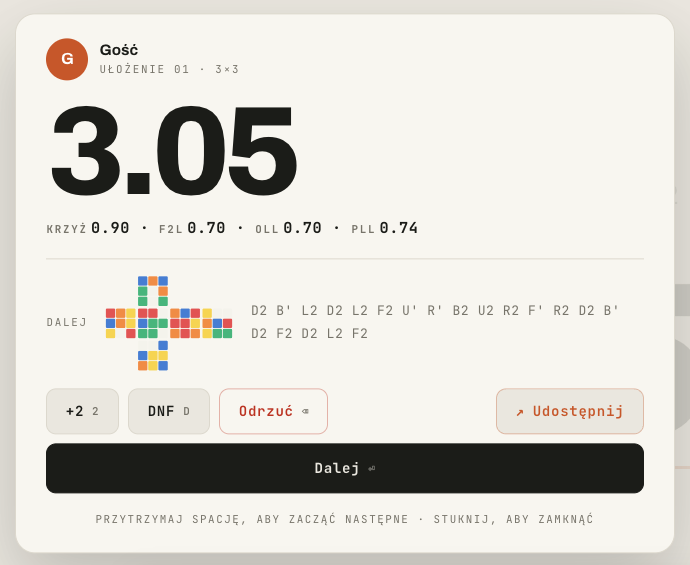
Splits by hand work for 3×3 and one-handed. With a smart cube connected you do not need them: the cube already splits every solve on its own, with the turns and the pauses, and those splits are much more exact than a thumb on the space bar.
A bigger scramble
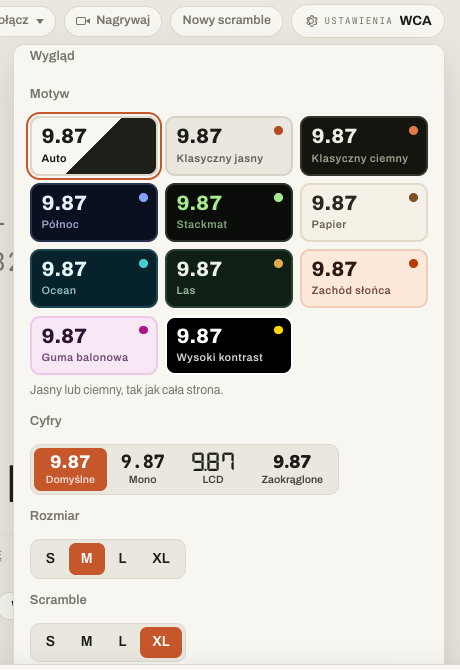
The clock has had a size setting for a while. Now the scramble has one too. In the settings, under Look, pick S, M, L or XL for the scramble, the same way you do for the digits. It follows your account, so your other browsers get it too.
An even metronome
The look-ahead drill clicks a metronome. Until now every fourth click was louder, so you could count the beat. A musician told us that after a slip he waits for the loud click before he turns again, which is the opposite of what the drill wants. So the Click setting now has two choices: Accent on one, as before, or Even, where every click sounds the same.

Two fixes
- Drills and SPACE. After you clicked "Try it again" or Start with the mouse, SPACE stopped working until you clicked somewhere else. Now it works right away.
- The order of your sessions. If you had ever arranged your sessions by hand, every session you made after that day landed under the arranged ones. Now a new session goes to the top, and your arrangement stays under it.
All of this is on the web today. The apps will follow. If something in your routine still needs csTimer, write to us: this whole update came from one message.